Showing posts with label QR codes. Show all posts

Wednesday

Intro to Art

I started the unit off with my very own digital gallery. I created QR Codes, borrowed the ipads we have available and threw them right in to looking at different art forms and telling me their opinions.
I pasted 18 different works of art around the room that could only be accessed by scanning the bar code. Below are 3 examples that I used.

 
They kept track of the name of the piece, artist, origin of the artist and their opinions using this sheet.
 I thought this would take about 30 minutes, but boy was I wrong! They got so into checking out other pieces by the various artists that this spilled over into the next day so in total, many of them ended up taking 90 minutes! I didn't mind though as they were very keen on seeing all these different forms of art, whom am I to deny them!
When we finally got around to talking about what they saw and their opinions en español, it was very interesting to see the differences in who liked what. Some pieces I thought they would like, most didn't like. Their use of extensive opinion-giving vocabulary was not as extensive as I would have liked, but this allowed them to see that there is much more than just saying "Me gusta" all the time, or "Es feo.". It gave them the opportunity to explore better ways to express opinions and why they liked or didn't like.
I then went on to ask more questions to extend the speaking portion of the class, asking which was their favourite and why, least favourite and why. Which medium was the most interesting, etc.
All in all, I think it was a very successful start to the unit, and although the language portion was limited in scope, I like that the first day got them excited about the unit. When some heard that we were doing art, they groaned and said "But this Spanish class!". That feeling is exactly what I'm hoping to dispel over these few of weeks.

La Nourriture Vocabulaire- QR Code activity

These are the step by step instructions of how I put this activity together.

Step 1: Choose 8 food items.

Step 2: Think of a simple and obvious clue for each (en français). 
And those are:
1) Shaylan et Sebastian mangent beaucoup de ça en classe. =les bonbons
2) C'est un végétal orange. =la carotte (I know it's not, but writing légume would have caused confusion amongst the troops.)
3) Le matin on mange ça avec du lait. =les céréales
4) Quand il fait chaud, on aime manger ça. =la crème glacée
5) Tu dois boire 8-10 de ça par jour. =l'eau
6) C'est un boisson blanc. =le lait
7) Le fruit peut être rouge ou vert. = la pomme
8) Quand tu vas au restaurant rapide tu bois ça.= la boisson gazeuse

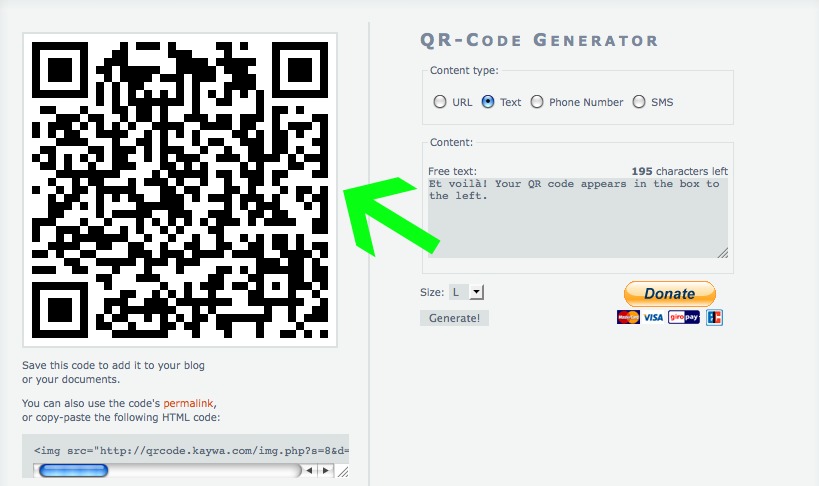
Step 3: Open Kayway QR Code Generator. Here is where each individual QR Code will be created. (Or Google another QR Code Generator of your choice.)

Step 4: As I entered a text clue and not a link to a website, I clicked on Text
Step 5: Type your text. *If your activity involves QR Codes linking to websites, make sure IN ADVANCE, that your students are able to use a data plan.

Step 6: Click the Generate button.
Step 7: Et voilà! Your QR code appears in the box to the left.

Step 8: Right click on your mouse/mouse pad and 'Save Image' to wherever you want.

Step 9: Just type over the previous text and hit Generate again to create a new code. Repeat this for however many you need.

Step 10: Open a Word document. 

Step 11: Insert as many text boxes as needed according to how many QR Codes there are. (I always work with text boxes so I can easily manipulate my images.)

Step 12: Number your text boxes.

Step 13: Insert each QR Code into its own text box. You can play with it to make it bigger or small. I made them relatively big so that the kids didn't have to get too close and squish each other. I chose to place 2 QR codes per sheet. Which I later cut in half prior to taping to the wall.

Step 14: Keep track of all the clues and what number they correspond to and the answer. (I didn't initially, but the clue is so easily accessed, it didn't affect the lesson, however, for a colleague I printed out all the info as she does not have the necessary mobile device.) But anyway, you will want to keep it as a reference in your resources.

Step 15: Print your Word document. Cut the pages in half. Tape around the room so there is space if there is a crowd.

For your students:


1) Only those who have access to free apps on their mobile device (iphone, itouch, Android, Blackberry-can be done with a laptop as well) can download the QR Code Reader.

2) Have them search a QR Code Reader in their App Store and make sure they choose a FREE one. (On my iphone, the one I've found to be the best so far is i-nigma.


3) Once the app is downloaded, open it.


3) Hold up the mobile device so that the QR Code is within the boundaries of the screen. (Just like a camera.)


4) With some apps, you have to click on a button that takes the picture, with i-nigma it automatically recognises the QR Code when it is on the screen.


5) The text or website that you linked to will pop up on the screen.

6) Figure out the clue. Write the French word on the sheet. 


In case you didn't see the actual worksheet that they were working with, here it is again. 

La Nourriture Vocabulaire- QR Code Activity


And here are the QR Codes. Don't forget that my #1 clue is specific to students in my class, so if you use these, be sure to create a new QR code for that one.


La Nourriture- QR Codes


Hopefully you have found this helpful. I'm pretty sure that I didn't forget a step, but if anything is unclear, let me know.


Friday

QR Codes in Applied French

What is a QR Code?
You know those UPC codes that the cashier scans at any check out counter? It is basically the same thing, but in a different format. That is the short and simple answer, and that's all I'm going to say about it.
-----------        --------------        ---------------     

I've always thought that our Applied students sometimes get the short end of the stick. 

For those of you not from Ontario, our Core French programme is broken down into Applied and Academic. The Applied streams tends to be significantly easier, homework isn't usually given, assignments and all other work is completed during class time, and I hate to say it, but the expectations are significantly lower. 

I am teaching a Grade 9 French Applied class for the first time since starting to teach in Canada and compare it to the ability level, behaviour and attitude that I experienced many time while teaching in London. However, there, they were not given the choice to choose between a more academic or not stream. Regardless of what the general perception is of the typical applied class, I still expect a lot from my students, within reason of course, and I try to provide them with the same types of stimulating activities that I do in my other classes.

On that note, they participated in their first QR Code activity this past week. We are currently in our food unit and I wanted a way to have them create a vocabulary list without just copying the words from the book. 

Before putting together the activity, I had to make sure we could actually accomplish it, in other words, that the kids had the necessary technology to access the QR codes. In my class of 13, only 2 were able to access free apps on their mobile devices, therefore I had to keep that in mind. So what I did was create different roles. 

1) The QR Code Reader
2) The Clue Decipherers
3) The Translator (I knew they wouldn't be lining up for this one, as they tend to despise using the dictionary! They always ask for the smaller of the 2 versions that we have, as the bigger one is "scary".)

I prepped the activity (I will post details about the process in the next entry), got very excited, went to class, only to find that we were down to 8 in the class that day! Then 1 took off for a Guidance appointment and took ages to come back, so we were down to 7 for a while. The teams, and yes, of course, there were teams, as the majority work much better with that competitive aspect, the teams ended up being quite uneven with 5 students on one and 3 on the other. In the end the 3 member team one as they were much more focused though!

Then I come to find out that one of the two who has a device that we were going to use, did not have it! He has had it every single day since day 1, I've confiscated it numerous times, and the one time I actually NEED HIM to have his mobile phone, HE DOESN'T HAVE IT! Can you believe it? I couldn't, and neither could any of the other kids in the class. Always the prepared teacher, I had made sure that my mobile was fully charged and had had a feeling that I would need it. As I knew I could entrust my kids to use it, I was more than happy to hand it over momentarily, all the while keeping an eye of course so they didn't get distracted by my son's games. (And as much as I thought they'd be curious to see what I had on there, they never once attempted to scroll through.)

Part 1 of the vocabulary gathering was using the QR codes to figure 8 clues that I had posted around the room, in French of course. I tried to use basic language so that they could be as independent as possible and tried to make the clues as obvious as possible. They did not have a word bank or a list to work from, all they knew was that we were starting our new food unit and this was their vocabulary list they were putting together. 

Part 2 of the activity was a series of images which they had to label in French and Part 3 was a traditional, here is the French word, translate to English.

All in all, after explaining how it would work, the winning team took 50 minutes to complete everything. I didn't think it would take that long, as we don't usually engage in activities in such large chunks, but it was technically, 3.5 different tasks, including the questions at the end. However, they were not distracted (ok, I'm fibbing, the 5 person team managed to chat enough that a few did not make it to the end where they had to answer questions.), so I change that to, on the whole, they were not distracted. But what I mean is that they were engaged. They were not bored, they seemed relatively interested, the QR code segment was the best part of course, and they really expressed a liking to the activity.

Click here to access the worksheet --> Nourriture vocab- QR Code activity  

And these are the QR codes here --> Nourriture vocab- QR Codes

All in all, a very successful class, if I do say so myself. 

The details of the creation of this specific activity will follow in the next post.

And just for fun:


Sunday

Entering the world of QR codes

The possibilities are endless with QR codes and I will finally be venturing further into the technological world by attempting a revision lesson next week employing QR codes to replace me! I will report back on how it went by the end of the week, so, wish me luck!

For those who are new to the term QR code or who have never heard of it, here are three brief youtube videos providing simple descriptions in different ways.